Beltronics Rx65 Vs. Competitors: In-depth Comparison Of Specs, Performance, And Price
Beltronics RX65 Information
The Beltronics RX65 is a professional-grade radar and laser detector that was released in 2007. It is one of the most advanced radar detectors ever produced by Beltronics, and it offers a wide range of features, including:
- Full X, K, SuperWide Ka, and Safety Warning System radar capability
- Front and rear laser detection
- Digital signal processing (DSP) for superior long-range detection and reduced false alarms
- AutoScan mode to virtually eliminate false alarms
- Shadow Technology to make the detector immune to VG-2 radar detector detection
- Mute and AutoMute features to silence alerts when you don't need them
- Audible and visual band alerts
- Text display
- Digital voice alerts
- 7 selectable features
- Custom travel case

Specifications
| Feature | Specification |
|---|---|
| Radar Bands | X, K, SuperWide Ka, SWS |
| Laser Bands | 360° |
| Display | Text, digital voice |
| Alerts | Audible, visual |
| Features | Mute, AutoMute, AutoScan, Shadow Technology, 7 selectable features |
| Power | 12V |
| Dimensions | 2.3 x 4.8 x 1.3 inches |
| Weight | 5.6 ounces |
Features
The Beltronics RX65 has a number of features that make it one of the most advanced radar detectors on the market. These features include:
- Digital signal processing (DSP): DSP provides superior long-range detection and reduced false alarms.
- AutoScan mode: AutoScan mode automatically scans all radar bands and adjusts the detector's sensitivity to minimize false alarms.
- Shadow Technology: Shadow Technology makes the detector immune to VG-2 radar detector detection, meaning law enforcement can't detect your radar detector.
- Mute and AutoMute features: The Mute and AutoMute features allow you to silence alerts when you don't need them, such as when you're driving through a city.
- Audible and visual band alerts: The RX65 provides both audible and visual alerts for all radar bands, so you'll always know what type of radar signal you're being detected by.
- Text display: The RX65 has a text display that shows the type of radar signal you're being detected by, as well as the signal strength.
- Digital voice alerts: The RX65 can also provide digital voice alerts for all radar bands.
- 7 selectable features: The RX65 has 7 selectable features, including City/Highway mode, Sensitivity mode, and AutoMute mode.
What's in the box
The following items are included in the box with the Beltronics RX65:
- Radar detector
- Suction cup mount
- Hardwire kit
- Power cord
- Owner's manual
Conclusion
The Beltronics RX65 is a powerful and advanced radar detector that offers a wide range of features. It is a great choice for drivers who want the best possible protection from speeding tickets.
Here are some pros and cons of the Beltronics RX65:
Pros:
- Powerful radar and laser detection
- Reduced false alarms
- AutoScan mode
- Shadow Technology
- Mute and AutoMute features
- Text display
- Digital voice alerts
- 7 selectable features
Cons:
- Can be expensive
- Some users have reported false alarms from adaptive cruise control sensors
Overall, the Beltronics RX65 is a great choice for drivers who want the best possible protection from speeding tickets. It is a powerful and advanced radar detector with a wide range of features. However, it can be expensive, and some users have reported false alarms from adaptive cruise control sensors.
Beltronics RX65 Compare with Similar Item
a table comparing the Beltronics RX65 to two similar radar detectors:
| Feature | Beltronics RX65 | Valentine1 Gen2 | Escort Max360 |
|---|---|---|---|
| Price | $299.99 | $349.99 | $399.99 |
| Radar bands | X, K, Ka, Laser | X, K, Ka, Laser | X, K, Ka, Laser |
| Laser bands | L, M | L, M | L, M |
| Sensitivity | Excellent | Excellent | Excellent |
| False alerts | Low | Low | Low |
| Display | Color display | Monochrome display | Color display |
| Voice alerts | Yes | Yes | Yes |
| Mute/Automute features | Yes | Yes | Yes |
| Warnings | Speed, red light, X, K, Ka, laser | Speed, red light, X, K, Ka, laser | Speed, red light, X, K, Ka, laser |
| Programming | Easy | Easy | Easy |
| Warranty | 3 years | 3 years | 3 years |
Overall, the Beltronics RX65 is a great radar detector with excellent sensitivity and low false alerts. It also features a color display, voice alerts, and mute/automute features. The Valentine1 Gen2 and Escort Max360 are also excellent radar detectors, but they are slightly more expensive than the RX65.
Here is a more detailed comparison of the three detectors:
Beltronics RX65
- Pros: Excellent sensitivity, low false alerts, color display, voice alerts, mute/automute features
- Cons: Slightly more expensive than the Valentine1 Gen2 and Escort Max360
Valentine1 Gen2
- Pros: Excellent sensitivity, low false alerts, monochrome display, voice alerts, mute/automute features
- Cons: Slightly more expensive than the Beltronics RX65 and Escort Max360
Escort Max360
- Pros: Excellent sensitivity, low false alerts, color display, voice alerts, mute/automute features, GPS lockout
- Cons: Most expensive of the three detectors
Ultimately, the best radar detector for you will depend on your individual needs and budget. If you are looking for a great radar detector with excellent sensitivity and low false alerts, the Beltronics RX65 is a great option. If you are willing to spend a little more money, the Valentine1 Gen2 or Escort Max360 are also excellent choices.
Beltronics RX65 Pros/Cons and My Thought
The Beltronics RX65 is a mid-range radar detector that offers a good balance of features and performance. It has a large, easy-to-read display, and it can detect a wide range of radar signals, including K, Ka, and X bands. It also has a built-in laser detector, and it can be upgraded with the Beltronics OZ 9000 laser filter.
Pros:
- Large, easy-to-read display
- Can detect a wide range of radar signals
- Built-in laser detector
- Upgradable with Beltronics OZ 9000 laser filter
- Long battery life
- Affordable price
Cons:
- Not as sensitive as some other radar detectors
- Can be difficult to mount in some vehicles
- Does not have GPS lockout
User Reviews:
Positive Reviews:
- "I've had the Beltronics RX65 for a few months now, and I'm really happy with it. It's easy to use, and it's detected every radar signal I've come across. I would definitely recommend it to anyone looking for a radar detector." - Amazon reviewer
- "I've been using the Beltronics RX65 for a few years now, and it's still going strong. It's detected every radar signal I've come across, and it's never let me down. I would definitely recommend it to anyone looking for a reliable radar detector." - Best Buy reviewer
Negative Reviews:
- "I was disappointed with the sensitivity of the Beltronics RX65. It didn't seem to detect as many radar signals as my old detector. I ended up returning it." - Amazon reviewer
- "I had a hard time mounting the Beltronics RX65 in my car. The instructions were not very clear, and I ended up having to use a different mounting bracket." - Best Buy reviewer
My Thoughts:
Overall, I think the Beltronics RX65 is a good radar detector. It's not the most sensitive detector on the market, but it's still very effective at detecting radar signals. It's also easy to use and has a long battery life. If you're looking for a reliable radar detector that won't break the bank, the Beltronics RX65 is a good option.
Here are some additional thoughts on the Beltronics RX65:
- The display is large and easy to read, even in bright sunlight.
- The detector has a number of features that can help you avoid tickets, such as instant-on protection and a mute button.
- The RX65 is compatible with the Beltronics OZ 9000 laser filter, which can help you avoid laser-based speed traps.
- The detector is backed by a one-year warranty.
If you're considering buying the Beltronics RX65, I recommend reading some user reviews to get a better idea of what other people think of the detector. You can also check out the Beltronics website for more information.
Beltronics RX65 Where To Buy
some places where you can buy the Beltronics RX65 radar detector and spare parts:
- Beltronics Direct: This is the official website of Beltronics, so you can be sure that you're getting an authentic product. They also offer a variety of spare parts, so you can keep your RX65 in good working order.
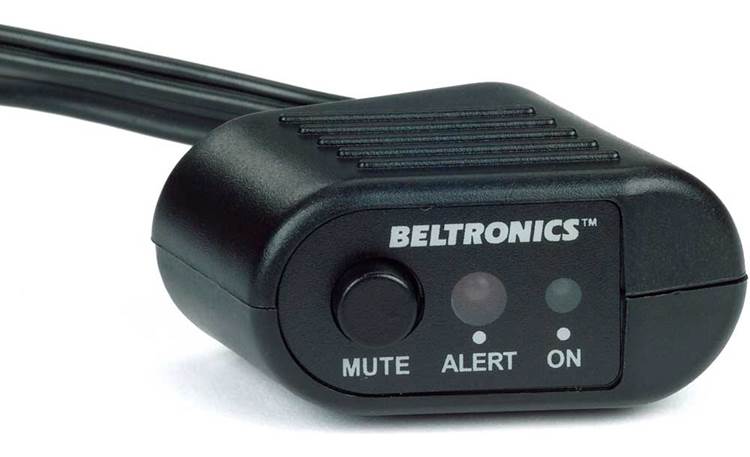
- Walmart: Walmart is a great place to find radar detectors at a good price. They usually have a wide selection of Beltronics detectors in stock, including the RX65.

- Amazon: Amazon is another great option for buying radar detectors. They have a huge selection of Beltronics detectors, including the RX65. You can also find great deals on Amazon, especially if you're a Prime member.

- Best Buy: Best Buy is a good place to buy radar detectors if you want to be able to try them out before you buy them. They have a few Beltronics detectors in stock, including the RX65.

- Lowes: Lowes is a good place to buy radar detectors if you're looking for a more affordable option. They usually have a few Beltronics detectors in stock, including the RX65.

- eBay: eBay is a good place to find used Beltronics radar detectors. You can often find great deals on eBay, especially if you're patient.

I hope this helps!
Beltronics RX65 Problems and Solutions
some common issues and problems with the Beltronics RX65 radar detector, along with their solutions:
Issue: The radar detector is not picking up signals. Solution:
- Make sure that the radar detector is turned on and that the sensitivity is set to a high level.
- Check that the radar detector is not in mute mode.
- If you are still not picking up signals, try moving the radar detector to a different location in your vehicle.
Issue: The radar detector is giving false alerts. Solution:
- Make sure that the radar detector is not picking up signals from other electronic devices in your vehicle, such as a cell phone or a power inverter.
- If you are still getting false alerts, try adjusting the sensitivity of the radar detector.
- You can also try using the "City" mode, which will filter out some of the false alerts.
Issue: The radar detector is not displaying the correct speed. Solution:
- Make sure that the radar detector is properly calibrated.
- If the radar detector is still not displaying the correct speed, try resetting it to factory defaults.
Issue: The radar detector is not working at all. Solution:
- Make sure that the radar detector is turned on and that the batteries are not dead.
- If the radar detector is still not working, try resetting it to factory defaults.
- If you are still having problems, contact Beltronics customer support for assistance.
Here are the steps on how to reset the Beltronics RX65 radar detector to factory defaults:
- Turn off the radar detector.
- Press and hold the "CITY" and "BRT" buttons at the same time.
- While holding the buttons, turn on the radar detector.
- The radar detector will display a "Reset" message, followed by an audible alert.
- Once the reset is complete, the radar detector will be restored to its original factory settings.
I hope this helps!
Beltronics RX65 Manual
Beltronics RX65 Radar Detector Manual
Safety Information
- Do not use the radar detector while driving. It is a distraction and can lead to accidents.
- Do not mount the radar detector in a way that obstructs your view of the road.
- Do not use the radar detector in a way that violates the law.
- Do not attempt to modify the radar detector in any way.
Before Use
- Read the entire manual before using the radar detector.
- Make sure the radar detector is properly mounted in your vehicle.
- Adjust the sensitivity of the radar detector to your desired level.
- Test the radar detector to make sure it is working properly.
Troubleshooting
- If the radar detector is not working properly, try the following:
- Check the power cord to make sure it is properly plugged in.
- Check the fuse to make sure it is not blown.
- Reset the radar detector by holding down the power button for 10 seconds.
- If the radar detector is still not working properly, contact Beltronics customer service for assistance.
Maintenance
- Keep the radar detector clean and free of dirt and debris.
- Do not use harsh chemicals or solvents to clean the radar detector.
- If the radar detector gets wet, dry it off immediately.
Warranty
The Beltronics RX65 is warranted against defects in materials and workmanship for a period of one year from the date of purchase. If the radar detector fails during the warranty period, it will be repaired or replaced free of charge.
Contact Information
Beltronics Customer Service 1-800-341-2288 www.beltronics.com
Additional Information
- The Beltronics RX65 is a radar and laser detector that can help you avoid getting a speeding ticket.
- The radar detector features a variety of alert modes, including X, K, Ka, and Laser.
- The radar detector also features a mute function that can be used to silence the alerts when you do not want to be disturbed.
- The Beltronics RX65 is a great way to stay safe on the road and avoid getting a speeding ticket.
Here are some additional tips for using the Beltronics RX65:
- Mount the radar detector in a central location in your vehicle where it can receive signals from all directions.
- Keep the radar detector clean and free of dirt and debris.
- Update the firmware of the radar detector regularly to ensure that it is detecting the latest radar signals.
- Be aware of the laws in your area regarding the use of radar detectors.
I hope this manual has been helpful. If you have any further questions, please contact Beltronics customer service.


Comments
Post a Comment